3D Bundle Photoshop Layer Style for Effortless Design
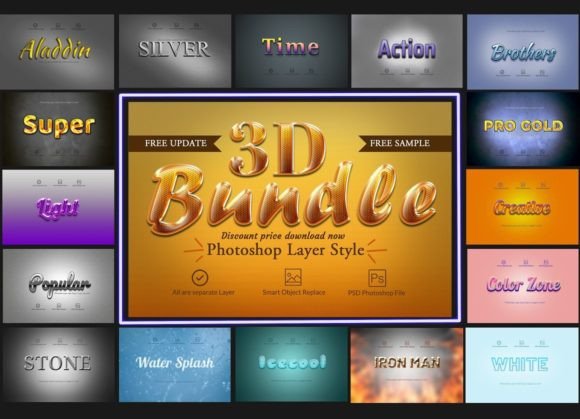
Creating professional-grade 3D typography often feels like a steep learning curve that requires hours of studying complex filters, lighting engines, and texture mapping. However, the 3D Bundle Photoshop Layer Style changes the game entirely by removing the technical barrier. This resource allows you to generate stunning three-dimensional text effects instantly, without needing advanced skills or deep knowledge of Photoshop's 3D workspace. Whether you are a seasoned graphic designer looking to speed up your workflow or a small business owner who needs high-quality assets for social media, this bundle offers a streamlined path to visual excellence.
Why This Tool Matters for Modern Creators
In today's digital landscape, static images simply do not capture attention the way dynamic, dimensional graphics do. The human eye is naturally drawn to depth, shadows, and highlights, which is why 3D fonts have become a staple in marketing materials, app interfaces, and web design. Traditionally, achieving this look required manual layering, blending modes, and precise shadow adjustments. With the 3D Bundle Photoshop Layer Style, those steps are automated into pre-configured settings. You can apply a style with a single click and then simply replace the text to match your specific message. This efficiency means you spend less time fighting software and more time focusing on creativity and strategy.
Key Characteristics and Technical Strengths
The core strength of this bundle lies in its flexibility and ease of use. It comes packaged with 24 distinct PSD files, each containing fully editable layers. This means you are not stuck with a flattened image; every element remains accessible for customization. The files utilize Smart Object technology, which is crucial for maintaining high resolution regardless of how much you resize your text. If you need to change the font, color, or even the underlying texture, the process is seamless.
Furthermore, the bundle includes essential extras that elevate the final output. You get a dedicated decoration file to add flair, along with lens inclusion files that simulate realistic light refraction and glass effects. The included fonts are free Google Fonts, ensuring that you have legal, high-quality typefaces ready to use immediately without worrying about licensing issues. The working software version is optimized for CS4 (English), but it maintains backward compatibility with versions as old as CS2 and CS3, while also supporting newer iterations like CS5, CS6, and the Creative Cloud suite. This broad support ensures that almost anyone with a standard installation of Adobe Photoshop can utilize these resources effectively.
Practical Applications Across Industries
The versatility of the 3D Bundle Photoshop Layer Style extends far beyond simple text manipulation. Its utility spans across various sectors, making it an invaluable asset for professionals and hobbyists alike. Below are several real-world scenarios where this tool delivers immediate value.
- Digital Marketing and Web Design: For landing pages, banner ads, and email headers, 3D text creates a focal point that increases click-through rates. You can easily create an unlimited pack of variations by matching the style with any product image or brand color scheme.
- Print Media and Advertising: Move posters, flyers, and brochures from flat to vibrant. The high-resolution nature of the PSD files ensures that when printed on business cards, large format posters, or promotional cards, the edges remain crisp and the shadows look natural.
- Mobile App and Game UI: Developers and designers often struggle to make buttons and titles pop on small screens. Using these styles, you can create game menus, app icons, and wallpaper backgrounds that feel immersive and polished.
- Presentations and Education: In After Effects for presentations or educational slides, static text can be boring. Incorporating 3D elements helps emphasize key concepts, making the content more engaging for students or clients during a pitch.
- Social Media Content: Bloggers and influencers can quickly produce consistent branding across Instagram stories, YouTube thumbnails, and Facebook posts without hiring a dedicated designer for every post.
Enhancing Brand Identity and User Experience
Consistency is the backbone of strong branding. When you use the 3D Bundle Photoshop Layer Style, you ensure that every piece of communication carries the same level of quality and aesthetic appeal. By customizing the colors and textures to match your brand guidelines, you create a cohesive visual language. This consistency builds trust with your audience. Moreover, the improved visual hierarchy provided by 3D effects guides the user's eye to the most important information, enhancing the overall user experience (UX) whether they are reading a website or holding a physical brochure.
Getting Started: Implementation and Best Practices
Implementing this bundle is straightforward, but understanding how to leverage its full potential requires a few practical considerations. First, ensure your Photoshop version supports the features included in the package. While the bundle supports older versions like CS2, utilizing CS4 or later will provide access to more advanced rendering capabilities if you choose to tweak the effects manually.
- Download and Extract: Once you download the link, extract the files to a dedicated folder. Keep the help files handy for quick reference on specific layer structures.
- Text Replacement: Open any of the 24 PSD files. Locate the text layer, which is usually grouped under a smart object. Double-click the thumbnail to open the text editor, type your new copy, and hit save. The 3D effect will update automatically.
- Customization: Don't be afraid to experiment. Change the fill color of the text layer, adjust the stroke weight, or modify the drop shadow opacity. Since all layers are editable, you can mix and match elements from different files to create unique combinations.
- Exporting: For web use, export your designs as PNG files to preserve transparency. For print, ensure you export at 300 DPI in CMYK mode if your printer requires it.
Considerations for Long-Term Use
While the tool removes the need for heavy lifting, it does not remove the need for design sense. Even the best 3D effects can look tacky if the font choice is poor or the background is cluttered. Always ensure there is sufficient contrast between your 3D text and the background. Additionally, remember that while the bundle provides free Google Fonts, you can swap them out for any other font installed on your system, provided you maintain readability. The goal is to enhance the message, not obscure it.
Ultimately, the 3D Bundle Photoshop Layer Style is more than just a collection of presets; it is a productivity booster. It democratizes high-end design, allowing entrepreneurs, educators, and marketers to produce professional results without the years of training typically required. By integrating these tools into your workflow, you unlock the ability to create unlimited variations tailored to any project, ensuring your visual content stands out in a crowded marketplace.